Our assessment
Research profile
RobotTools checked Autodesk product, pricing, support and company-news pages on 11 August 2026. This profile has not been based on a hands-on product test, so it does not carry a RobotTools rating or recommendation.
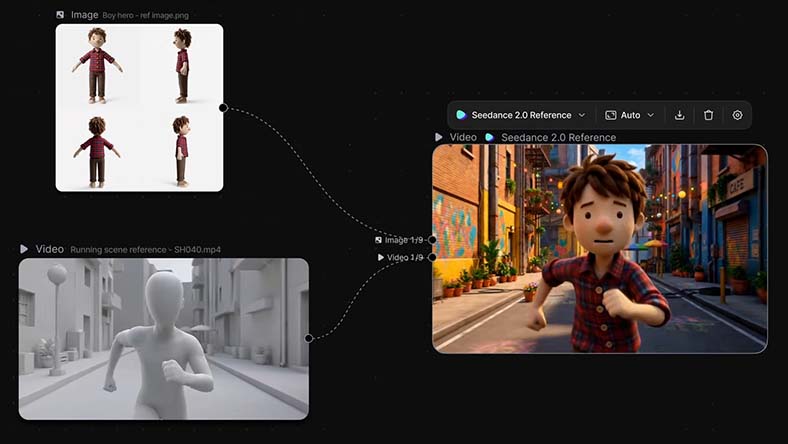
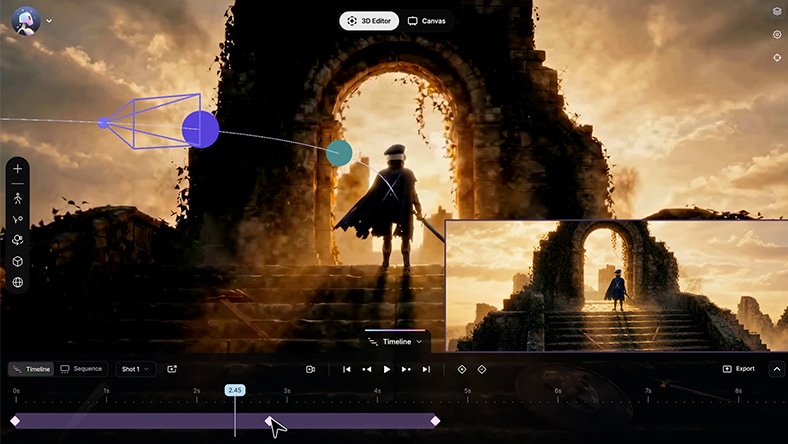
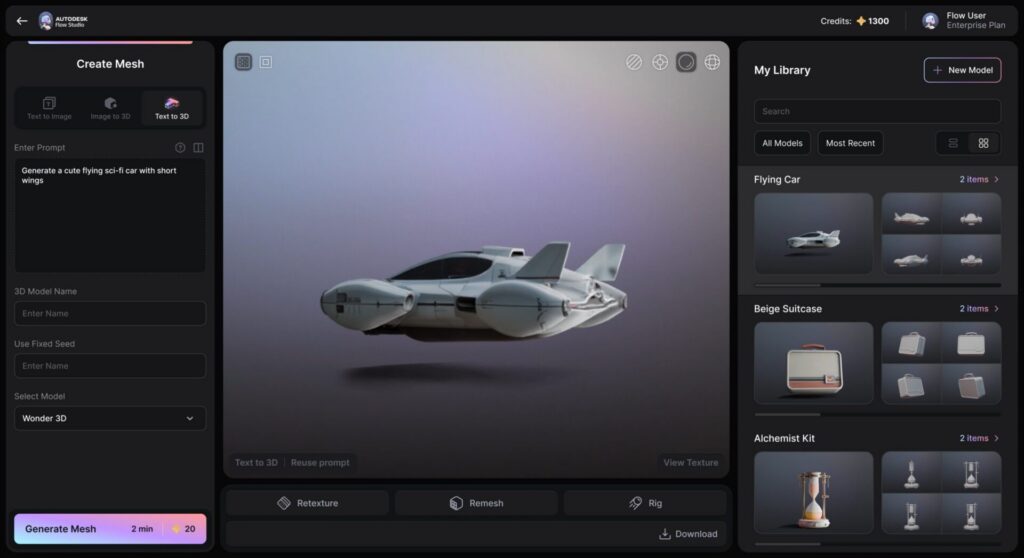
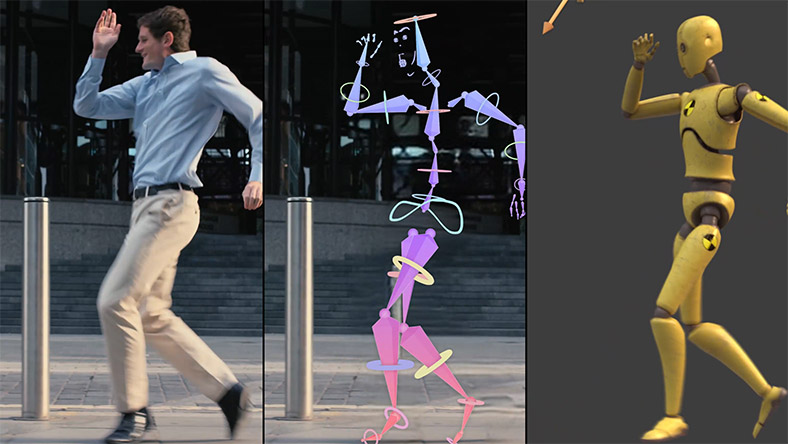
Autodesk Flow Studio is a cloud-based production toolkit for turning filmed performances, generated assets and 3D scene elements into editable visual-effects work. The product began as Wonder Studio from Wonder Dynamics and now sits inside Autodesk’s media and entertainment portfolio.Its established workflow analyses live-action footage to extract body, face and hand motion, camera movement and scene data. Creators can replace performers with CG characters or export motion capture, camera tracks, clean plates, masks, character passes and 3D scenes for further work in tools such as Maya, Blender and Unreal Engine.Flow Studio has expanded beyond character replacement. Wonder Tools adds text-to-3D, image-to-3D and image-generation workflows, while 3D Editor and Canvas combine scene blocking, camera direction and a node-based 2D generation workspace. This makes the product broader than a conventional AI video generator, but also more dependent on credit limits, cloud processing and the user’s wider production workflow.
Flow Studio is aimed at independent filmmakers, VFX and animation artists, previsualisation teams, creative agencies and studios that need editable motion, camera and scene data rather than only a finished generated clip. It can also serve beginners exploring motion capture or 3D workflows through the free tier, although production use still benefits from an understanding of animation, compositing and asset preparation.
Who it suits
Independent filmmakers and small VFX teams
It can automate initial motion capture, camera tracking and CG character placement without a dedicated capture stage.
Artists who need editable 3D outputs
USD, FBX and individual scene elements can move into established DCC tools for further work.
Previsualisation and concept teams
Video-to-3D conversion, generated assets and the 3D Editor can shorten the route from an idea to a directed scene.
Studios already using Autodesk tools
Flow Studio is designed to exchange work with Maya and other common animation and game-production tools.
It may not suit you if
Offline or self-hosted pipelines
Flow Studio is presented as a cloud-based service, with cloud processing, storage and credit allowances.
Teams needing predictable unlimited processing
Each plan has monthly credits and limits for storage, upload size, export resolution and concurrent generation.
Users expecting a one-click final shot
Autodesk describes an iterative workflow. Generated assets still need review, direction and, in many cases, finishing work.
Productions that cannot upload sensitive footage
The service processes project material in the cloud. Enterprise controls should be assessed before using confidential or restricted footage.
How it works
Prepare footage or assets
Upload a live-action clip, generated assets or existing scene elements, depending on the chosen workflow.
Analyse the shot
Flow Studio scans the footage or scene to identify performers, motion, cameras and relevant scene information.
Assign and direct
Choose CG characters or generated assets, refine the performance and block cameras or scene elements in the 3D workspace.
Generate and review
Run the cloud process, inspect the result and repeat where motion, staging or generated imagery needs adjustment.
Export for finishing
Export the final render or selected motion, camera, mask, plate and 3D elements to the downstream production tool.
Pricing
Flow Studio uses five tiers: Free, Lite, Standard, Pro and Enterprise. Autodesk confirms an ongoing free plan with no credit card, while paid prices vary by region and billing term.
The main differences are monthly credits, export resolution, cloud storage, maximum upload size, custom character allowance and the number of performers supported for motion capture. Enterprise adds much larger storage and credit limits, seven-person motion capture and stronger data controls.
Autodesk previously announced US Lite pricing of $10 per month in August 2025. Check the current regional buy page before subscribing because the live Autodesk page localises prices and billing terms.
Free
Free
Ongoing free plan
300 credits/month, 720p export, 1GB storage, 100MB upload, 3 custom characters, 1-person motion capture
Testing the workflow and small experiments
No credit card required. Feature and export restrictions apply.
Lite
Regional price
Monthly or annual options
2,100 credits/month, 1080p export, 5GB storage, 500MB upload, 6 custom characters, 2-person motion capture
Individual creators needing more capacity
Autodesk announced US pricing of $10/month in August 2025. Verify the current regional price.
Standard
Regional price
Monthly or annual options
6,000 credits/month, 4K export, 20GB storage, 500MB upload, 15 custom characters, 3-person motion capture
Creators and small production teams
Plan access and feature differences should be checked on the current tier comparison.
Pro
Regional price
Monthly or annual options
12,000 credits/month, 4K export, 80GB storage, 2GB upload, 50 custom characters, 4-person motion capture
Larger teams and higher-volume production
Pro is included in Autodesk’s Media & Entertainment Collection according to Autodesk’s 2025 announcement.
Enterprise
Contact sales
Contract pricing
48,000 credits/month, 4K export, 1TB storage, 2GB upload, 50 custom characters, 7-person motion capture
Studios needing scale and business controls
Autodesk states that AI data opt-out is enabled by default for Enterprise.
Compatibility and technical details
Deployment: Cloud
API: Not confirmed
Self-hosting: No
Autodesk Maya
Export and pipeline workflow
Autodesk documents workflows and data exchange with Maya through common 3D scene and animation outputs.
Blender
Export and pipeline workflow
Motion, camera and scene outputs can be taken into Blender for refinement.
Unreal Engine
Export and pipeline workflow
Autodesk lists Unreal Engine as a downstream tool for exported assets and scene data.
Autodesk 3ds Max
USD workflow
Autodesk states that generated CG scenes can be used in 3ds Max through USD.
Universal Scene Description
Open standard
USD supports exchange of editable 3D scene data across compatible tools.
World Labs Marble
Asset import
Autodesk identifies Marble worlds and environments as assets that can be brought into the 3D Editor workflow.
Access
Primary platform
Cloud-based web application
Checked in source
Input
Live-action footage
Video clips and edited sequences; maximum upload size depends on plan
Checked in source
Output
Motion data
USD and FBX motion-capture output
Checked in source
Output
Scene elements
Camera track, 3D scene, character pass, alpha mask, clean plate and final render
Checked in source
Output
Maximum resolution
720p on Free, 1080p on Lite and up to 4K on Standard, Pro and Enterprise
Checked in source
Capacity
Monthly credits
300 Free, 2,100 Lite, 6,000 Standard, 12,000 Pro and 48,000 Enterprise
Checked in source
Capacity
Motion-capture performers
1 to 7 people depending on plan
Checked in source
Generation
Wonder 3D cost
20 credits per text-to-3D, image-to-3D or text-to-image generation
Checked in source
Generation
Concurrent generations
1 Free, 5 Lite, 10 Standard, 15 Pro and 20 Enterprise
Checked in source
Data, rights and business controls
Flow Studio uploads and processes footage, prompts and assets through Autodesk’s cloud service. Autodesk’s public tier comparison states that AI data opt-out is enabled by default for Enterprise. The current public product pages do not provide enough detail to assign a single training-data policy across every plan, so RobotTools records that point as not confirmed.Autodesk tells users to own or have permission to use uploaded material, obtain consent for images containing people and avoid third-party trademarks or brand identifiers. Generated outputs may vary, may not be unique and should be reviewed before production use. Commercial-use rights should be checked against the current Autodesk terms and the rights attached to any third-party input or model.Autodesk advertises single sign-on among support and subscription benefits. Organisations should confirm the precise plan entitlement and security requirements during procurement.
Data processing: Cloud
Training data: Not confirmed
Commercial rights: Not confirmed
SSO: Yes
Frequently asked questions
Is Autodesk Flow Studio the same product as Wonder Studio?
Yes. Autodesk states that Flow Studio was formerly Wonder Studio, created by Wonder Dynamics. Autodesk acquired Wonder Dynamics in 2024 and subsequently integrated the product into its portfolio.
Can Flow Studio be used for free?
Yes. The ongoing Free tier includes 300 monthly credits, 720p maximum export, 1GB storage, a 100MB upload limit, three custom character uploads and one-person motion capture.
Does Flow Studio only replace actors with CG characters?
No. It also covers markerless motion capture, video-to-3D scene conversion, individual VFX exports, text and image to 3D generation, 3D scene direction and node-based 2D generation.
Can its output be edited elsewhere?
Yes. Autodesk documents USD and FBX outputs and workflows involving Maya, Blender, Unreal Engine and 3ds Max, alongside individual exports such as camera tracks, masks and clean plates.
Does it run locally?
Autodesk presents Flow Studio as a cloud-based service with cloud processing, storage and rendering. RobotTools found no public self-hosted option.
Has RobotTools tested Flow Studio?
No. This is a research profile based on current Autodesk product, pricing, support and company-news sources. It does not include a hands-on rating or recommendation.
Product history
21 May 2024
Autodesk agrees to acquire Wonder Dynamics
The company behind Wonder Studio joined Autodesk, placing the product within Autodesk’s media and entertainment business.
12 Aug 2025
Flow Studio launches a free tier and new pricing structure
Autodesk introduced Free and Standard tiers, reduced the announced US Lite price and formally completed the product’s integration into Autodesk.
4 Mar 2026
Wonder 3D generation tools added
Text-to-3D, image-to-3D, text-to-image, remeshing and texturing workflows became available across all tiers.
4 Aug 2026
3D Editor and Canvas launched
Flow Studio expanded into directable 3D scene assembly and node-based 2D generation, moving beyond its original character-replacement workflow.
Sources and verification
RobotTools uses official product pages, documentation and other named sources. Dates show when each source was last checked.
Autodesk Flow Studio overview
Official product page
Checked 11 Aug 2026
Autodesk Flow Studio plans and tier comparison
Official pricing
Checked 11 Aug 2026
Autodesk Flow Studio buy page
Official pricing
Checked 11 Aug 2026
Flow Studio free tier and pricing announcement
Official company news
Checked 11 Aug 2026
Introducing Wonder 3D
Official company news
Checked 11 Aug 2026
Flow Studio 3D Editor and Canvas launch
Official company news
Checked 11 Aug 2026
Autodesk General Terms
Terms or privacy policy
Checked 11 Aug 2026